Goodbye T-Mobile, Netflix, and Hulu, Hello Tello

We’ve been with T-Mobile since January 2018. Over the years the cost has kept creeping up to the point where when they announced in July they’d no longer be giving a $10 kickback to any line not exceeding 2 GB of data, our monthly bill was $168. Ridiculous!
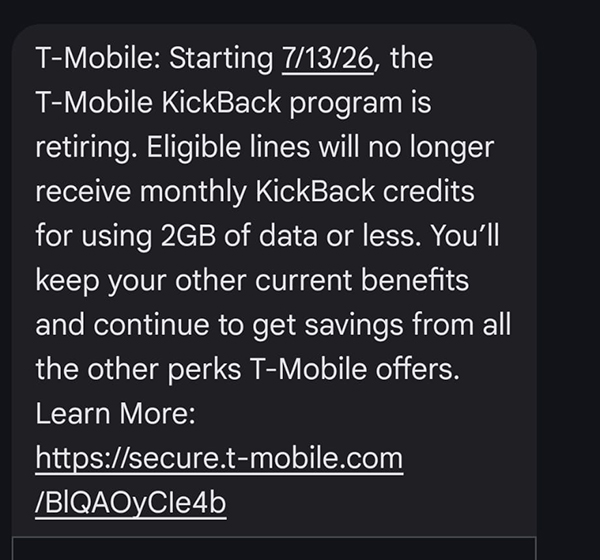
They justify charging so much because of the perks they provide, but Netflix was no longer free like it was at the beginning. As of this writing our portion was $13 even though they added free Hulu a year or so ago. Why they just couldn’t keep Netflix free when the value of Hulu was $13 is beyond me.

In addition, the T-Mobile Tuesday perks were getting worse. Gone were the days you’d get free food outright. First it was spend $2, then it was $5, etc. The value just kept dropping while the price kept increasing. Plus the offerings were becoming less and less appealing overall and only tempted us to eat more fast food than we normally would.

So we said that’s enough and decided to switch to Tello since I was already familiar with it after setting up my brother on it. Their rates are so reasonable and they use the T-Mobile network too. I switched my phone over in late July to make sure we wouldn’t regret it and when I didn’t notice any difference Joe switched his on August 8th.

I immediately checked our Hulu and Netflix accounts and while Hulu showed as cancelled, Netflix did not. It showed we’d start getting charged directly the following day, so I immediately cancelled the account to make sure that wouldn’t happen.

It feels freeing to have fewer streaming services so we can concentrate on what’s left and extract more value from it.

As it stands, we now have:

HBO MAX – $2.99 per month until December
MGM+ – free until 9/22
Peacock – free as long as we have Xfinity internet

Plus there’s always the Roku Channel and Pluto which surprisingly has a lot to choose from.

Not to mention our own streaming service, Jellyfin, that we watch our DVDs via.

The only thing we need to square away is our last T-Mobile bill. After there were no longer any lines on it, the bill that was issued on July 28th, which showed us pre-paying for service through August 28th, didn’t update to reflect us no longer having service with them. The customer service reps Joe spoke with gave conflicting information about whether in August 28th things would update to reflect the changes, so we removed our payment info from their site so they couldn’t automatically charge us, and decided to not pay that July bill until we see what happens. I’ve heard murmurings that T-Mobile doesn’t issue pro-rated bills, but if they think I’m going to pay them for services not rendered they have another thing coming. I harbor grudges against companies that try to do me dirty, so for their sake I hope they do the right thing adjust the last bill accordingly or we won’t ever consider them for service again in the future. Just ask Best Buy. They screwed with us over $20 and we went from shopping there nearly every weekend to never giving them another dime in over 20 years now. So if T-Mobile decides to screw with us over about $90 they will potentially lose thousands in the long-run. I guess we’ll see what happens, and I will post an update here at the end of the month.

Disney+ Billing Shenanigans

On July 28th I was on chat, then the phone, with Disney+ for 45 minutes.

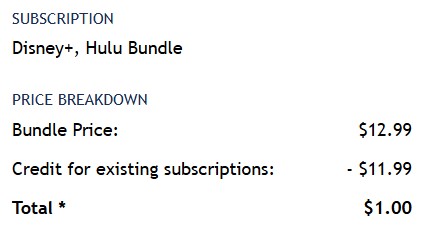
We’ve had Hulu free via T-Mobile since sometime in early 2025 I believe. In November 2025 I learned I was able to add Disney+ for $1 which was then billed to me directly by Disney+. Due to the Hulu portion being free, my charges looked like this (taken from the email Disney+ sent me when I signed up):

Everything was fine, until yesterday when I noted on my credit card a charge from Disney+ for $12.99. I logged into my Disney+ account and saw two subscriptions:

One for the Hulu/Disney bundle showing $12.99
One for Hulu on Us via T-Mobile for $0 (which was greyed out since you have to manage it via the T-Mobile website).

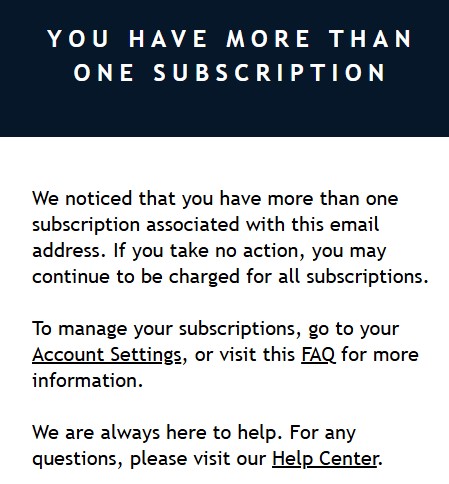
I thought back to an email I got in June from Disney+:

At the time I did log into my Disney+ account and didn’t see two subscriptions, or anything other than the $1. I chalked it up to a phishing scam but kept the email just in case. I forgot about the whole thing until I saw that charge.

I was told by the nice Disney+ rep that T-Mobile won’t allow the $1 upgrade, so my choices were to pay the full bundle price or cancel it and be left with just Hulu. I did the latter, and also requested a refund for the charge (which they processed).

I wish I had thought to take screenshots of the billing page in my account throughout all this but I did not.

When I checked Reddit there were multiple posts about this happening to other people and they were given different explanations by the Disney+ reps, so who knows what the truth is:

1) T-Mobile no longer allows adding Disney+ for $1 more
2) Since Hulu and Disney merged billing systems, it no longer allows split billing
3) It was a mistake caused by the Hulu and Disney merge and would be rectified

I’m not sure I buy any of those explanations and this is why:

1) Why would T-Mobile care what subscribers do beyond their free subscription?
2) If Disney+ can show two subscriptions on the account, then they can adjust the pricing on the one that includes Disney+ like they did in the past.
3) If it was a billing error, shouldn’t it have been rectified by now? Those posts were weeks ago and I still had the same thing happen to me.

My thought? They are trying to double-dip. In any case, we weren’t using Disney+ much anymore and were planning on getting rid of T-Mobile soon (more on that in a future post) and therefore will be cancelling Hulu (and Netflix) soon anyway.

Sony Bravia 65″ LED TV

On November 22nd we got a new tv for the living room.

Back in January our Samsung 55″ TV started showing purple spots which have since multiplied and indicate the LEDs are going out. I watched a video on how to replace them and it’s a ridiculous process, so we decided it would be better to buy a new TV instead. We originally planned to wait until the Samsung died completely, but with the upcoming tariffs expected in January, the cost of electronics is going to increase, so we made the decision to purchase now instead.

I did a lot of research and based on how bright our living room is, and that sunlight hits the screen directly sometimes, an OLED was out. They’re pretty expensive anyway, and Joe didn’t want to spend more than we spent on the Samsung, so we kept our budget to $1000-$1200 and settled on a Sony Bravia XR 65″ (X90CL) for $999 at Costco.

We decided on Costco instead of our preferred retailer, ABT, because Costco was offering a free extended warranty which will now cover the TV for five years.

Due to its size, it wouldn’t fit with the stupid legs on our existing TV stand, so we also had to buy a new tabletop stand for it which we got from Amazon. We like our TV stand and didn’t want to spend another $500+ to get a new one. I’m not necessarily regretting that decision, but I am a little bummed that the TV sits higher than I would have liked and because of how it hangs from the stand, it’s tilted ever so slightly back to keep it from toppling forward. The stand also allows you to swivel the TV which makes getting it to look straight a bit of a challenge, but the swivel makes access to the back of the TV easier. There are always tradeoffs.

Why these TV manufacturers almost exclusively use ugly feet on smaller TVs that can handle a middle stand is beyond me, but I hate it, because you either have to buy a wider TV stand or mount the TV on the wall or a middle stand like we opted to do.

And you can also tell from the photo that the TV is now blocking the shelf we had above the old TV that held the center channel and two speakers for our audio system. It looks stupid to me and I’d like to remove it and push the TV back a little more.

I’m having trouble adjusting to the larger screen size. Apparently 55″ was ideal, at least for me (Joe doesn’t find the bigger screen overwhelming like I do). I’m just glad we didn’t get a 75″. We considered it until measuring out how much that would cause us to have to spread out the furniture surrounding the TV console to accommodate it.

I’m still working on adjusting the TV’s picture settings to get things how I like them. I feel like the color in particular is too warm with a green cast to it. As it stands now, I feel like the Samsung has a better picture/resolution than the Sony even though the Samsung only has a 60 Hz refresh rate whereas the Sony has 120 Hz. I’m hopeful that once I get the settings to our liking I will no longer feel that way.

I do like that the Sony uses Google’s Android TV for their OS. It was one of the reasons we didn’t get another Samsung or an LG, although I still don’t understand why they all put the streaming apps in one ridiculously long row instead of using a grid system like Roku does. Sure, you can rearrange the order of the apps, but it’s still cumbersome having a single row of every app you use. It’s annoying having to scroll through so many apps to get to the one you want, especially when Sony put a bunch of their proprietary apps in the list. Couldn’t those at least been placed in a separate row beneath the streaming apps? And don’t get me started on how I can’t even delete certain apps at all, like Disney+ and YouTube Music.

Because the OS is powered by Google, I was able to set up a screensaver to display photos directly from Google Photos. It’s really cool watching some of my best photos cycle through on such a large screen. It even inspired me to go back and re-edit older photos so they are displayed in a higher resolution and look sharper now that I have better editing software and have learned new photo processing techniques. You can also play Spotify through the TV while watching the screensaver which is fun.

The sound, which is Dolby Atmos, is much richer than the old TV, I will give Sony that. But by the same token, the richer sound is weird to me when watching TV shows in particular. I guess I’m used to, and prefer, a flatter sound, particularly when watching sitcoms where dialog is the focus. This explains why I rarely turned on our stereo system or felt the need for a sound bar. There is a dialog sound setting on the TV but it still doesn’t sound right to me. I’ve been waiting to see whether I’d adapt to the richer sound before tinkering around with it, however.

I just hope as time goes on I adjust to the TV. I am very sensitive to change and it sucks to be excited for something new but then not like it at first. That seems to happen a lot with me, however, so I’m trying to remember that and not feel disappointed by how I feel.

Bye Bye Evernote, Hello Joplin

I logged into Evernote the other day only to find I could no longer create new notes. I got this message when I tried.

They’ve been pestering me to upgrade to a paid account for months now, but there was never prior warning that there would be restrictions put in place if I didn’t comply. Pretty shady, if you ask me.

I guess they think it’s fine to just change things and let people know abruptly via the app AFTER said changes took affect. Pretty shitty way to treat people you’re hoping to turn into paying customers. It’s not exactly extortion, since the data is still accessible, but it’s also not the best way to entice people to get on board with a paid subscription either.

And of course the price is higher now than when they first started pestering me. Maybe if back then they’d have said “hey, if you do not upgrade, we’re going to lock your account down and you won’t be able to create any new notes if you already have over 50, or move existing notes around”, people might have paid more attention. I know I would have. But if they think I’m paying them $130 annually to use their service, they have another thing coming.

I immediately tried a new service called AnyType, but I didn’t care for it. Then GoogleKeep. Ditto. I already pay for Microsoft 360 so I thought I’d give OneNote another try even though it used to corrupt my notes almost daily many years ago when I used it at work. Doesn’t matter, though, because they changed the look of it and I hate that too.

In comes Notion. Very feature rich, free without note limitations, similar layout to Evernote. Great. Even has a way to pull your Evernote data into it. Well, that’s what they claim anyway. That process failed and after some investigation apparently there are certain notes in Evernote, namely those that contain tables, that cause issues, and for some reason this has been an issue for years with Notion without any resolution. Great. And since I couldn’t move those notes from one Notebook to another, since Evernote locked me out of that option, I was kinda stuck.

After trying for hours to figure out a way to get my Evernote data into Notion, I gave up. I found an app called Joplin that didn’t have issues with the import process. Sure, I still had to export my Evernote data for each notebook individually, then import into Joplin, but at least it worked!

Joplin is free, I use Dropbox as my database server, and there’s desktop and mobile versions of the app. It’s not quite as pretty as Evernote, nor have I yet found a way to mark certain notes as shortcuts in order to access them quickly, but my data is safe and I’m able to manipulate it how I want… for free.

Don’t get me wrong – I would have paid Evernote a reasonable price, but $10.83 per month is not reasonable for a note-taking app. I pay that for Photoshop and Lightroom!

Furthermore, I do not want to give my money to an underhanded company who pulled what they did. That company, Bending Spoons, has the appropriate initials – BS. Because that’s what they are full of, and they can go to hell for treating their users this way. And the Evernote bootlickers on Reddit calling us all whiny freeloaders for complaining can all go to hell as well.

Update 12/28/23 – Joplin is already driving me crazy due to how it stores & syncs data using Dropbox. I’m constantly getting notices from Dropbox’s desktop program about files being added/deleted (these are temporary files created by Joplin). I am probably going to subscribe to UpNote. I have been using the free version for a few days and it looks more like Evernote, plus has pinned notes which I like. It’s also affordable – $1 monthly or $30 for a lifetime subscription that they claim will be honored even if they move to a different subscription type in the future. It’s been around since 2017 so I think my data will be safe (plus I create weekly backups of this blog, my bookmarks, and my notes because I’m paranoid about losing stuff).

March 2023 Recap

It wasn’t until March came along that I remembered how much I hate March. You start hearing all the birds in the morning so it feels like it should be sunny and warm, but it isn’t. What a letdown!

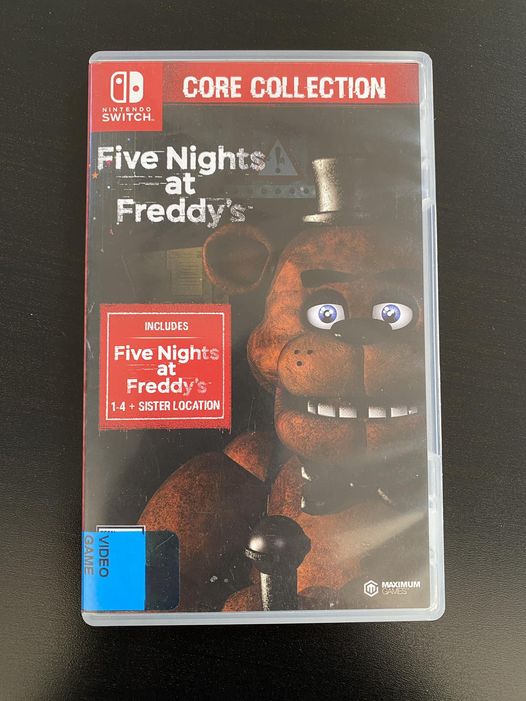
When we went to the Apple Store in February we had to walk around the mall to kill time and I kept seeing Funko Pops for Five Night at Freddy’s. I had to look it up because I had no clue what it was. Intrigued, I borrowed the game from the library. Umm… I don’t get the fascination. It was mildly interesting, but mostly boring. Of course, I was murdered by 3 am, so ymmv.

This was McDonald’s customer service response to me asking WHY they don’t allow you to pay with the Arch Card (aka McDonald’s gift card) in the app. Thanks for nothing, Jannie.

We started re-watching Aqua Teen Hunger Force and it is as funny as I remember. Well, the first three seasons, that is. Which is where I think we must have stopped because we’re on the fourth season now and it’s getting less funny and more nonsensical.

Based on IMDB reviews it seems some seasons are better than others, so we’ll continue to plow through, but damn. I do love Master Shake, though, because he’s such a unapologetic selfish asshole. And the Moonnites are the best!

Girl Scout cookies from our friend’s granddaughter:

I did not care for the Trefoils or Lemon-ups, but I really loved the S’mores. I bet I could recreate them with some Biscoff, Nutella, and marshmallow fluff/cream.

Decided I wanted to refresh my fake flower collection and went to Michael’s to look around. All the spring floral was 50% off so I got all this for only $4.14 out of pocket thanks to the digital gift card I got from Discover. Retail price was close to $80 which honestly seems ridiculous. I would never “pay” that even with a gift card.